Wix Has Been Using Your Content to Train Its AI. You Can't Opt Out
Key Insights
Essential takeaways regarding Wix's AI training policies and platform migration realities.
Expand key insights
- Wix's Broad AI License: Section 3.1 of Wix's Terms of Use grants Wix a non-exclusive, transferable, sub-licensable, royalty-free worldwide license to use your content to train its AI models. This includes unpublished pages, private content, and backend logic that external web scrapers cannot reach.
- No Opt-Out Provision: There is no opt-out. Wix does not offer a setting to disable AI training on your content. Using the platform means accepting the clause in full.
- Transferable to Third Parties: The license is transferable and sub-licensable. Wix can share your content with third parties for AI training, not just use it internally. Your original business content, unpublished drafts, and proprietary strategies can reach systems you have never heard of.
- Opt-In Alternatives Exist: Not every platform takes the same position. Webflow's public AI policy states: "We believe that your data is yours, and yours alone" and commits to making any future AI training change opt-in rather than opt-out. Alternatives do exist.
- The "Wix Lock-In": Migrating from Wix is harder than most users expect. Wix does not export content in standard formats. Pages, designs, and settings cannot be moved directly to another platform without manual rebuilding.
- Managed Migration Advantage: The fastest, lowest-friction migration for most small business owners is a done-for-you rebuild in 24 to 48 hours. Attempting a manual Wix export typically results in broken content, lost SEO, and weeks of work. A managed service handles all of it.
Wix Has Been Using Your Content to Train Its AI. You Can't Opt Out
The Wix AI Training Clause: What You Agreed to in Section 3.1
Why There Is No Opt-Out of Wix's AI Training (And What That Means for Your Business)
What This Means for Your Business
Wix Alternatives Compared: Where to Go Instead
Best Wix Alternatives for Small Business Owners in 2026
How to Migrate From Wix: Step-by-Step Guide for Each Platform
The fastest exit: done-for-you migration with Storebox
Why Storebox Is the Best Alternative to Wix for Small Business Owners
The Wix AI Training Clause: What You Agreed to in Section 3.1
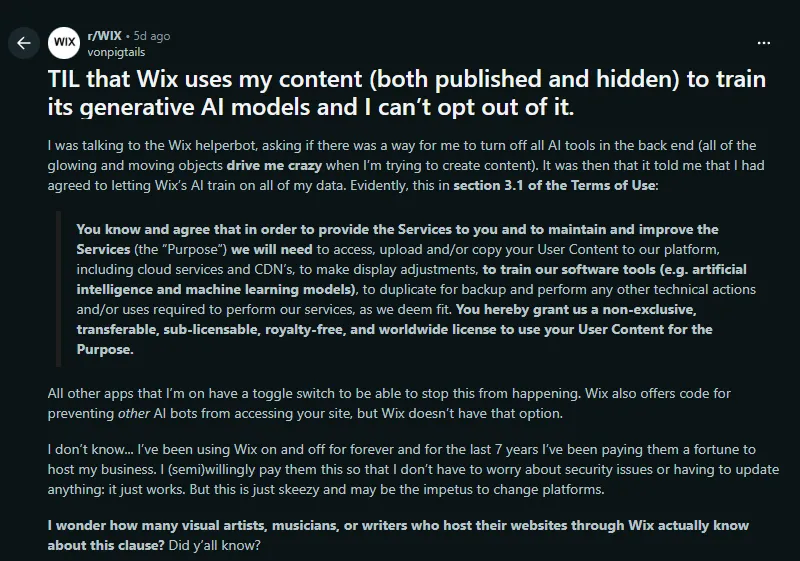
On June 8, 2026, a Wix user posted to r/WIX after discovering something buried in Wix's Terms of Use during a conversation with the platform's help chatbot.
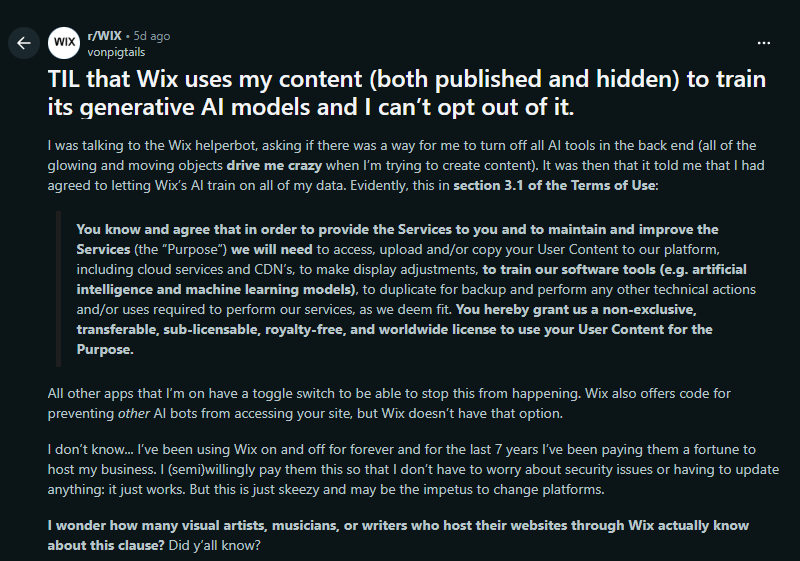
The clause the redditor found is in Section 3.1 of Wix's Terms of Use. Here is what it says:
"You know and agree that in order to provide the Services to you... we will need to access, upload and/or copy your User Content to our platform... to train our software tools (e.g. artificial intelligence and machine learning models)... You hereby grant us a non-exclusive, transferable, sub-licensable, royalty-free, and worldwide license to use your User Content for the Purpose."
Security researcher and developer Jacob Greenhow analyzed the clause in depth, noting that the concern goes beyond what web scrapers can access: "When you use Codux or other Wix development tools, you're giving them access to data that wouldn't normally be accessible to web crawlers. This includes your backend logic, admin pages, development workflows, and unpublished content."
Why There Is No Opt-Out of Wix's AI Training (And What That Means for Your Business)
Most platforms that collect user data for AI model training offer at minimum a toggle in account settings or a documented opt-out process. Wix does not.
The platform provides code you can add to your site to block external AI bots from scraping your public pages. There is no equivalent setting to prevent Wix's own systems from accessing your content for training. Accepting the Terms of Use is the condition of service, and the terms do not expire when you downgrade or stop adding content.
This is not a passive harvest. You have actively granted a license through a clickthrough agreement. The clause does not say Wix may access your content. It says you grant them the right to do so.
What This Means for Your Business
The practical implications go beyond "Wix uses my blog posts."
Unpublished drafts are included. Content you never made public, including draft pages, unpublished posts, and content in your Wix editor that was never saved or launched, is accessible to Wix's systems. External scrapers cannot reach it. Wix can.
The license is transferable and sub-licensable. Your content can be shared with third parties for AI training. You have no visibility into which third-party systems may have processed your business content, brand voice, or proprietary materials.
Renewal pricing adds a compounding concern. Known issues with Wix include the renewal pricing inflation pattern documented repeatedly in the r/WIX community: users paying $100 in year one and receiving a $370 renewal invoice in year two. Paying more each year while the platform's AI clause remains unchanged shifts the cost-benefit calculation considerably.
There is no exit clause. The content you uploaded during your time on Wix was processed under the terms active at that time. Moving to a different platform does not retroactively restrict what Wix has already trained on.
For users who have built up years of blog content, business pages, and creative work on Wix, the decision to migrate from Wix is not only about platform features. It is about whether the terms governing that content still align with what a paying customer should reasonably expect.
Wix Alternatives Compared: Where to Go Instead
The alternatives to Wix fall into three categories: other DIY builders, specialized platform builders, and done-for-you managed services like Storebox. Each has different trade-offs on control, time investment, and cost.
| Alternative | Best for | AI training on your content | Content export | Migration time |
|---|---|---|---|---|
| WordPress.org (self-hosted) | Tech-comfortable owners wanting full control | No stated AI training; depends on hosting choice | Manual rebuild required (no native Wix export) | 20-40 hrs DIY |
| Webflow | Designers and agencies; strong AI policy | Explicitly no AI training; opt-in only for any future change | Partial export available | 10-25 hrs |
| Squarespace | Simple service businesses | Review current ToS; has been updated | Limited content export | 15-30 hrs |
| Shopify | E-commerce focused businesses | Review current ToS | Product/order CSV export; design is rebuilt | 15-40 hrs |
| Duda | Agencies building for clients | Review current ToS | Agency-level tools, not DIY-friendly | Agency migration |
| Storebox (done-for-you) ★ | Small service businesses wanting a fast exit | No AI training on your content | Not needed. We rebuild the site from your business details. | Under 48 hrs |
Best Wix Alternatives for Small Business Owners in 2026
A note on Webflow: its public AI policy includes this explicit commitment: "We believe that your data is yours, and yours alone, which is why we are proud to say that we do not use your data to power any of our generative models today." This is the clearest alternative-to-Wix policy statement currently available from a major website platform.
How to Migrate From Wix To Other Platforms: Step-by-Step Guide
The table below summarizes what each migration path requires, so you can choose based on time, cost, and technical confidence before committing.
| Migration path | Time required | DIY cost | Agency / service cost | SEO impact during migration |
|---|---|---|---|---|
| Wix to WordPress | 20-40 hrs | $10-$30/mo hosting + plugins | $400-$2,000 | 4-12 week ranking dip; full recovery depends on redirect quality |
| Wix to Shopify | 15-40 hrs | From $39/mo (Shopify Basic) | From $500 | Moderate; product URLs change, need 301 redirects |
| Wix to Duda | Agency-managed | Not DIY-friendly | Agency pricing | Managed by agency |
| Wix to Storebox ★ | 0 hrs — 100% done for you | From $9.99/mo | Included | Minimal; new build on custom domain avoids redirect chain |
Wix to WordPress Migration
Migrating from Wix to WordPress is the most requested migration path and the most technically demanding.
What transfers from Wix to WordPress: blog posts can be exported via RSS and imported using a plugin like WP All Import. That is the extent of what transfers natively. Pages, design, forms, and navigation must all be rebuilt from scratch in WordPress.
What you need to set up on the WordPress side:
A hosting plan: SiteGround starts around $3.99 a month, WPEngine from $20, Kinsta from $35. The difference is support quality and managed security.
A theme: Astra and Kadence are the two most commonly used lightweight themes for service business sites. Both are free with paid add-ons.
Plugins for functionality you relied on in Wix: Yoast or RankMath for SEO, WPForms for contact forms, a booking plugin if you took appointments, and a schema plugin (Schema Pro is the most straightforward option).
301 redirects from every old Wix URL to the equivalent WordPress URL. Skipping this step means search engines treat your WordPress site as entirely new content, and your existing rankings reset.
A Wix to WordPress migration service from a specialist agency runs $400 to $2,000 depending on site size. Agencies that can migrate your site from Wix to WordPress typically have 2 to 4 week lead times. When you migrate Wix to WordPress, you gain full data control and no AI training clause. The ongoing cost is plugin maintenance and hosting management.
Wix to Shopify migration
Wix to Shopify migration is the right path for e-commerce-first businesses. Shopify's CSV import handles product catalogs reasonably well, which is the largest time-saver in the process.
What transfers in a Wix to Shopify migration:
Product data: name, SKU, price, inventory count, and product images export cleanly as CSV from Wix and import into Shopify
Customer data: can be exported from Wix and imported to Shopify's customer records
What does not transfer and must be rebuilt:
Site design: Shopify uses its own theme system (Debut, Dawn, and paid themes). Your Wix visual design does not carry over.
Page content: About, FAQ, and custom landing pages need to be recreated in Shopify's page editor
Blog posts: must be manually recreated or imported via a third-party tool
SEO meta tags and URL structures: all need to be reconfigured, with 301 redirects from old Wix product URLs to new Shopify URLs
Shopify plans start at $39 a month for Basic, which covers most small e-commerce operations. The migrate from Wix to Shopify process takes 15 to 40 hours depending on catalog size. Shopify's own migration support team is available but handles primarily the product data import, not the full site rebuild.
Wix to Duda migration
Wix to Duda migration is used almost exclusively by web design agencies managing multiple client sites. Duda's platform is built for agencies, not individual business owners. It includes client management dashboards, multi-site controls, and white-label options that make sense at agency scale.
For an independent small business owner looking to leave Wix, Duda may not be the right destination.
The pricing is agency-structured (starting around $19 a month per site with annual commitment), the learning curve is steeper than general builders, and there is no meaningful advantage over WordPress or a done-for-you service for a single-site business owner.
If you are an agency managing 10 or more client sites and evaluating a Wix alternative at scale, Duda is worth a demo. For everyone else, the options below are better fits.
Done-for-you migration from Wix to Storebox
The problem with every self-managed migration path above is time. For a working small business owner, 20 to 40 hours of migration work is 20 to 40 hours not spent on the business itself.
Storebox handles the migration differently from every other path. We do not export from Wix and reimport into a new platform. We rebuild your website from your current business information: your services, service area, pricing, and photos.
How the Storebox Migration Works
Leave the technical headaches behind. We handle the entire transition so you get a better site without lifting a finger.
More than just a migration
The result is a site that is better structured than what you had on Wix. LocalBusiness schema is included from day one, along with built-in service pages and FAQPage schema for AI search. Free migration is included at every Storebox plan level.
Why Storebox Is the Best Alternative to Wix for Small Business Owners
Wix alternatives fall into two categories: platforms that require you to do all the work (WordPress, Webflow, Squarespace) and services that do the work for you (Storebox).
If you have the time and technical confidence to migrate, rebuild, configure schema, set up local SEO, and maintain your site on an ongoing basis, WordPress with a quality host is a legitimate long-term choice with no AI training concerns and full data control.
If you are a working electrician, restaurant owner, cleaning service, or any other small business that cannot absorb 30 to 40 hours of website work, Storebox is the alternative. We build the site, we handle the move, and we maintain it going forward. The only thing you do is approve the draft.
Storebox was built by ex-Google search and AI engineers. Your content is not used to train anything. The site we build for you is yours.
Storebox Pricing
Simple, transparent pricing to help your business grow.
Starter
- ✓ Website
- ✓ Schema markup
- ✓ Local SEO
- ✓ Unlimited 24-hour edits
Growth
- ✓ Everything in Starter
- ✓ Review automation
- ✓ Lead routing
- ✓ Growth optimization
Pro
- ✓ Everything in Growth
- ✓ Multi-location pages
- ✓ Advanced analytics
No contract. Free migration from Wix in 24 to 48 hours. Your domain stays with you.